A marketing dashboard shows what happened. CDAI tells you what to do next.
CDAI is not a marketing dashboard. It is a nightly decision engine. It works out what each campaign made after the costs it can see, what its leads really cost, and gives you one clear decision for every campaign, with the reasons. See where those decisions land below, or read how it works.
The marketing dashboard alternative in action.
Each night’s decisions are read in the CDAI client portal. It is where you read the answer for every campaign, along with the numbers and the confidence level behind it. It is not a report you build.
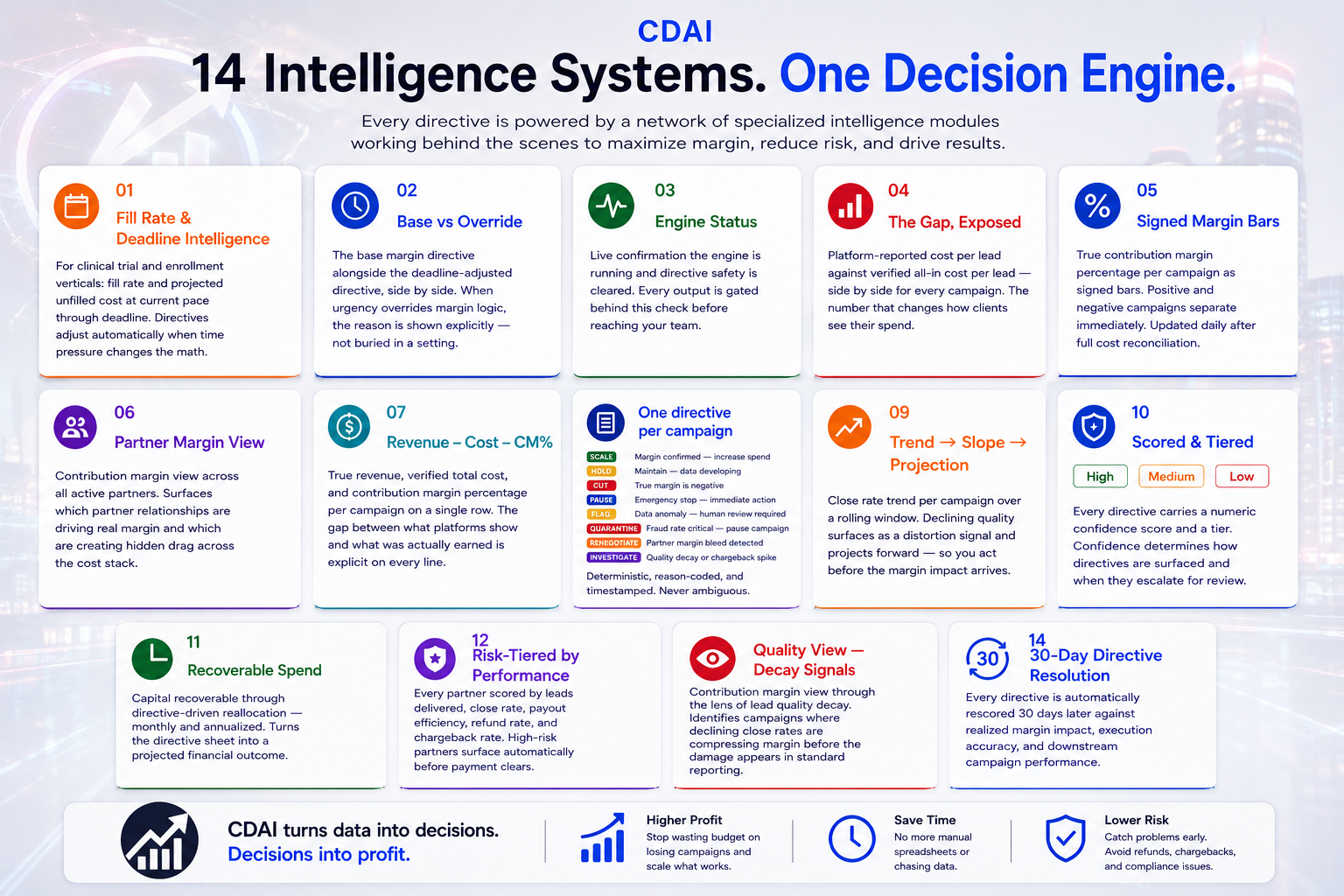
What a marketing dashboard cannot answer.
Wrike describes a marketing dashboard as a reporting tool that aggregates key marketing metrics and performance indicators. Teams build one in their CRM or a reporting tool, and HubSpot’s marketing analytics is a good example of the kind of reporting view many teams use.
A marketing dashboard answers “what happened in the ads?” The owner of a lead-driven business needs three different answers:
- Did each campaign make money after partner payouts, refunds, chargebacks, fees and the other costs it caused?
- What does a lead really cost, compared with what the ad platform says?
- What should I do with each campaign tomorrow?
CDAI is built around those three questions. You do not build or maintain a marketing dashboard with it. On each nightly run the engine calculates the numbers from your connected ad accounts and CRM, then makes the call. Keep your marketing dashboard for traffic and campaign reporting, and use CDAI for the profit and the decision. The true marketing ROI guide explains why the two views differ.
What one campaign row tells you.
A marketing dashboard puts every metric on a chart. CDAI puts every campaign on one row: the platform’s number next to the real one, and tonight’s decision. Here is what each part of the row means.
| On the row | What it means |
|---|---|
| Platform CPL | What the ad platform reports per lead: media spend divided by leads. |
| True CPL | Every cost the lead caused, divided by leads: media spend, partner payouts, refunds, chargebacks, platform fees, variable costs and compliance costs. |
| Real profit | Revenue minus the costs CDAI has been given, over a rolling window matched to your sales cycle (30 days by default). |
| Decision | SCALEHOLDCUTPAUSE and four more: one of eight decisions for each campaign. |
| Confidence | How much data stands behind the decision. A new account runs cautiously for its first week, because there is little cost history to judge against. |
This is why a campaign can look like the cheapest source in a marketing dashboard and still lose money. Once refunds, payouts and fees are counted, its true cost per lead is higher than the platform’s number. Our guide to the average cost per lead explains why the platform number runs low, and when ROAS looks good and the campaign still loses money shows how it plays out.
Every view. What it shows. Why it matters.
Each part of the CDAI portal is built around a decision your team needs to make. Nothing decorative, and nothing that needs an analyst to interpret.
CDAI rechecks its own math every night and grades its past decisions once the results are in. It recommends; you decide what changes in your ad accounts.
How to use the decisions each run.
- Start with the decisions. Look at anything marked cut or pause first; that’s where money is leaving.
- Check the CPL gap. A big difference between platform CPL and true CPL means costs outside the ad account are growing.
- Scale the proven winners. Add budget where real profit is strong and confidence is high.
- Watch the warning signs. A slipping close rate today becomes a losing campaign next month.
Our scale, hold, cut, pause framework goes deeper on turning each decision into a budget move, and the lead quality guide covers what to do when a source’s leads stop closing. To see the arithmetic yourself, use the contribution margin calculator guide or the ROAS calculator.
CDAI next to a typical marketing dashboard.
| Typical marketing dashboard | CDAI | |
|---|---|---|
| What it is | A reporting view you build and read | An engine that calculates and decides on a nightly schedule |
| Main numbers | Whatever you choose to chart, often clicks, leads and spend | Real profit, true cost per lead and margin per campaign |
| Costs counted | Depends on how it is set up | Ad spend, platform fees, partner payouts, refunds, chargebacks, compliance and variable costs |
| What you do with it | Read the charts and decide yourself | Read one decision per campaign, with the reasons |
| Setup | Build and maintain the reports | Connect your accounts; the engine does the calculation |
Many teams use both. If you are weighing CDAI against attribution tools, see Triple Whale, Rockerbox and Allocera side by side and the Dreamdata comparison. Before release, CDAI was validated on simulated businesses where the true answer is known. The method and every result are in the contribution margin marketing validation report, and the proof page and the true cost per lead case study show the numbers.
Every source the engine connects to.
Meta, Google Ads, LinkedIn, HubSpot and Salesforce connect through a sign-in flow. Other tools connect by API key, CSV upload or webhook. CDAI is built for 10 platforms plus CSV import and a generic webhook. See the public documentation for Meta’s Marketing API, the Google Ads API, HubSpot’s deals API and Salesforce’s Opportunity object. Our HubSpot ads ROI guide and Salesforce campaign influence guide cover the CRM side.
Marketing dashboard FAQs.
Is CDAI a marketing dashboard?
What is a marketing dashboard?
What are the three types of dashboards?
How often does CDAI update its decisions?
Does CDAI change my ads?
How do I get access?
See the decisions for your own campaigns.
Connect the ad accounts and CRM you already use, and your first decisions arrive after the first nightly run. Questions first? Send us a note and we’ll be in touch.
Request Received
We’ll review your submission and be in touch.